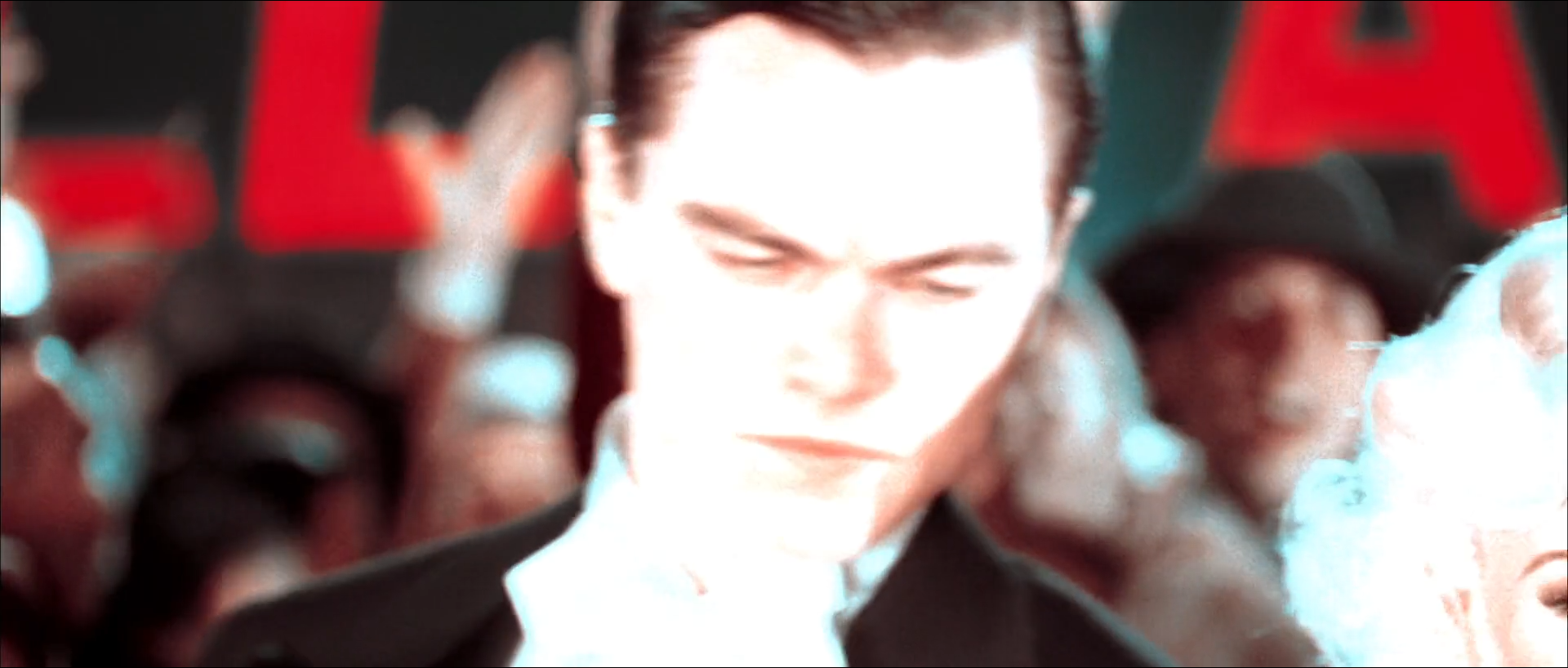
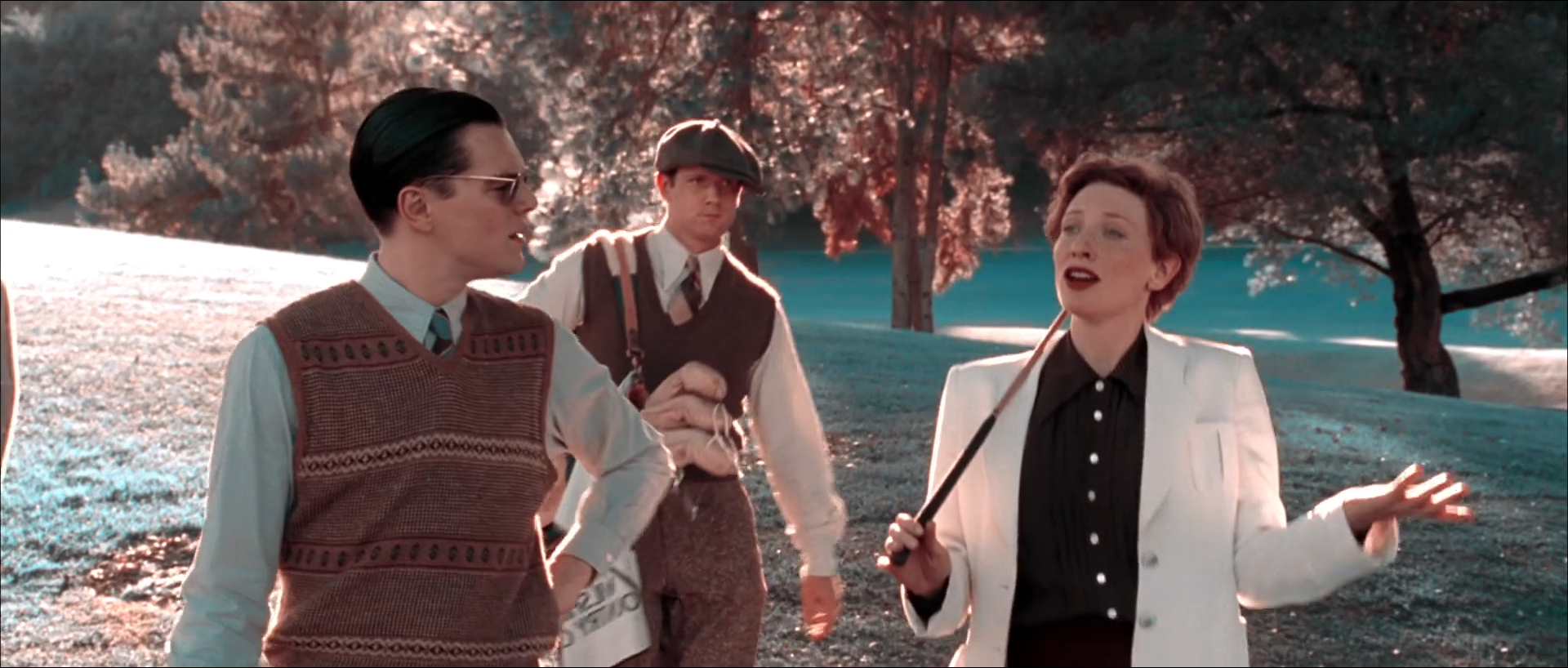
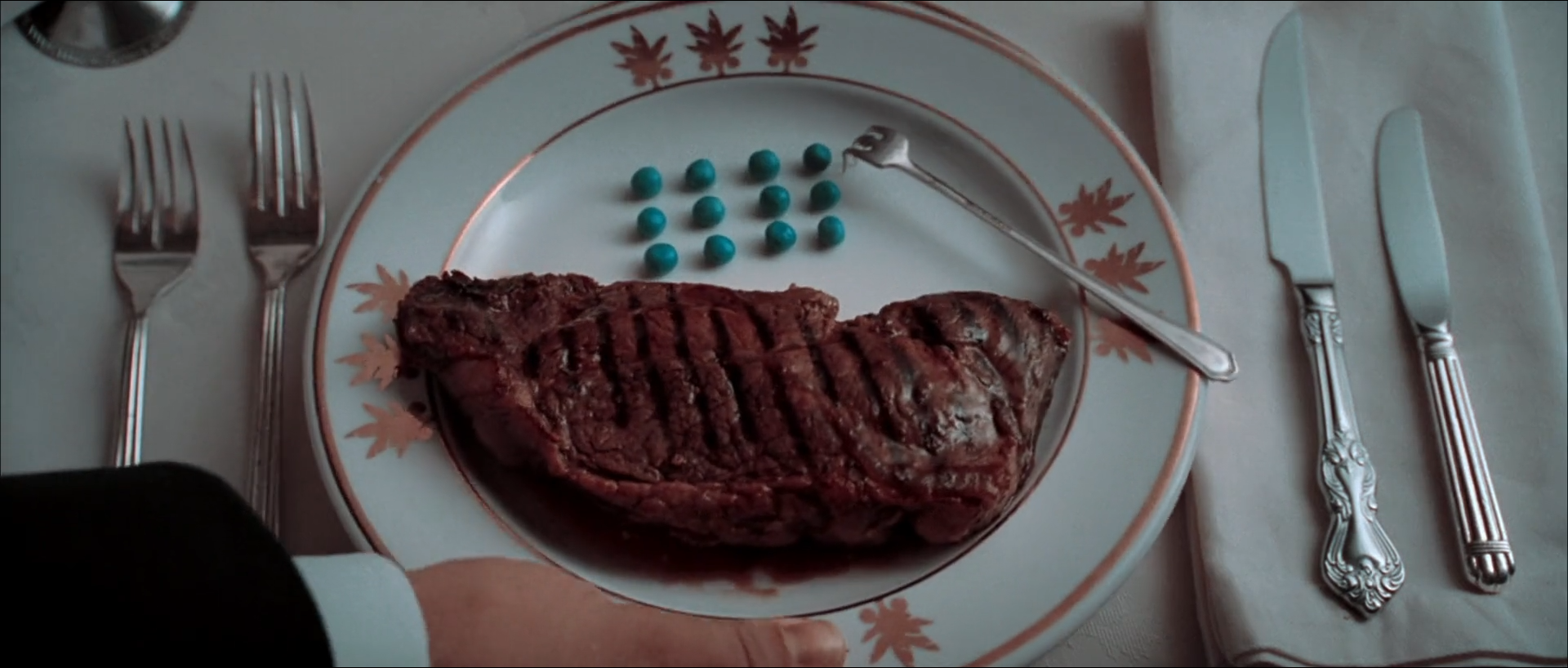
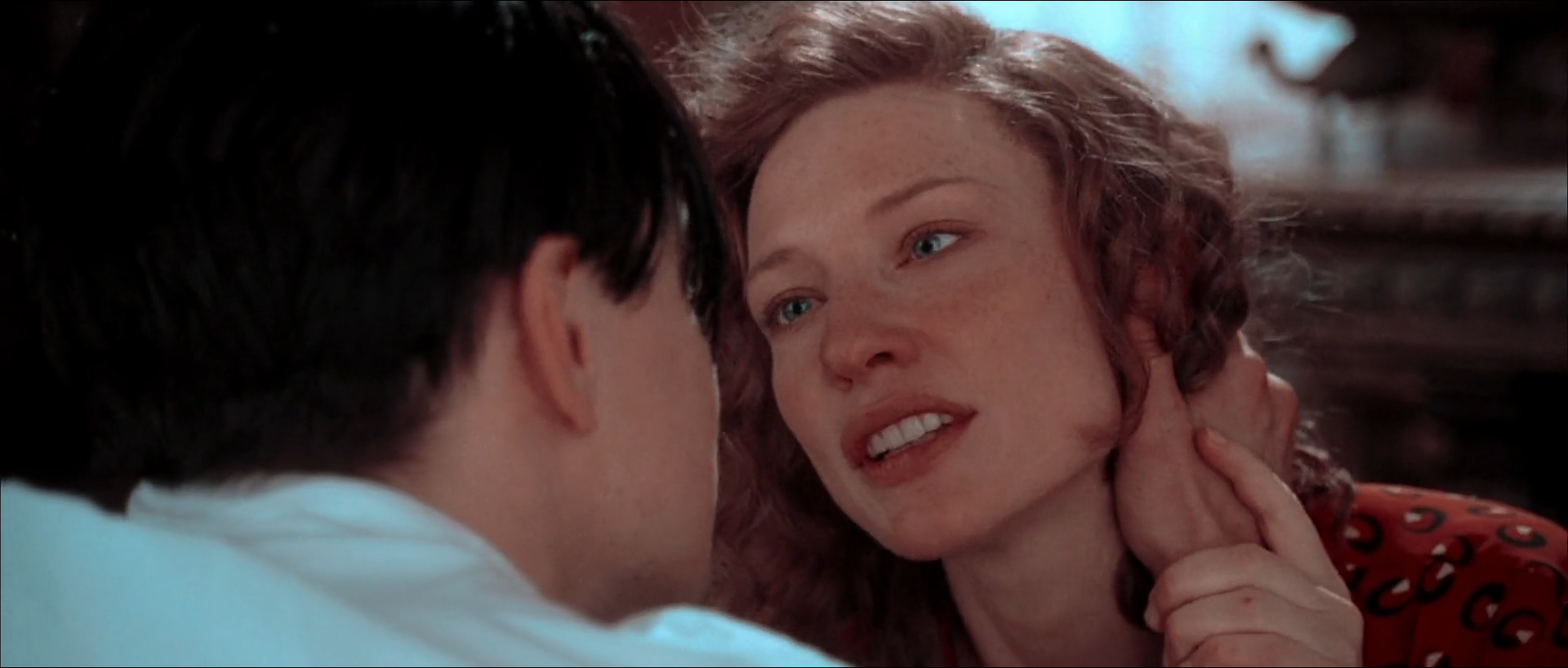
Eight frames from The Aviator's first fifty-three minutes, where every colour in the picture is made to lie on one line through grey — skin and red paint at one end, sky, grass and peas at the other — and the grade's work is to place those two poles, protect the faces on the warm one and let everything that should have been green go cyan.
For its first fifty-three minutes The Aviator does not look graded in the ordinary sense; it looks printed in two inks. Skin, red paint, brick and fire sit at one end of the colour space and sky, water, grass, tuxedos in shadow and a plate of peas sit at the other. There is no yellow sun, no green lawn and no blue sky, only a warm pole, a cool pole and grey between them.
The companion regime study in this repository, Two Inks, Then Three, measured that geometry across every shot of the film in OKLab. In its two-colour eras 97–98% of shots put their colour on a single straight line through neutral: the fitted axis sits at 27.2° in the 1927–1930 era and 29.0° in the 1935 era, with poles at 27° and 206.5°, 179° apart. Skin in those eras lands at a mean hue of 29–32°, on the warm pole within a few degrees; the middle 80% of reviewed skies lies between about 199° and 212.5°, and the peas beside Hughes's steak at 205.7°. The regime ends at one break, at shot 988, 53.25 minutes in. This report stays on the near side of it.
That makes the reconstruction problem unusually specific. A two-colour look is not a teal-and-orange grade with the saturation up; it is a projection that removes a whole dimension of colour and then places what remains. The eight studies take it apart one problem at a time — a red aeroplane against a turquoise sky, a crowded nightclub, a sky that was almost certainly built, a red-lit room with a cyan beam in it, a face erased by flashbulbs, faces among foliage the process turns rust and cyan, the peas, and a close-up in which skin is the whole warm pole.
Subject
The Aviator
Studies
8 frames
Measured against
3456 eligible midpoint frames
Interpretation
rec709
The film-level construction
What holds the look together
One line through grey
Two Inks, Then Three finds 97.7% of 1927–1930 shots and 97.0% of 1935 shots with an OKLab axis ratio below 0.03: their colour varies along one line and hardly at all across it. The median frame of the era reads about 0.009; the three-colour regime that follows reads 0.20. No hue-versus-hue curve produces this. It is a projection, and the reconstruction has to be one too.
The warm pole is aimed at skin
The fitted axis sits at 27–29°, and skin in the two-colour eras measures a mean OKLab hue of 29.1° and 31.5°. Faces therefore lie on the line rather than being pulled toward it, which is why they survive a transform that turns grass cyan. When the line is rotated, skin moves with it; the pole is placed from faces, not from red objects.
Everything cool lands in one place
Reviewed skies in these eras have median hues of 205.1° and 207.3°, with the middle 80% between about 199° and 212.5°, the curated peas at 205.7°, and the regime study's cool pole at 206.5°. Sky, water, grass, foliage in light and green vegetables become one cyan family because a two-record process has only one ink to give them. The fingerprint is not blue sky; it is that the sky and the peas are the same colour.
The warm end yellows as it brightens
The warm pole is not fixed. By lightness decile the 1927–1930 warm hue moves from about 20–24° in the shadows to 52.5° and then 77.3° in the top two deciles, while the cool pole stays near 206°. Dark warm areas read blood-red and bright ones read orange-pink to straw. A single global rotation cannot reproduce this; it is a luminance-dependent hue move on the warm side only.
Resolve blueprint
A node tree built to be adjusted, not copied blindly
Normalize camera originals into DaVinci Wide Gamut / DaVinci Intermediate with Resolve Colour Management or a documented input CST, and grade exposure, contrast and skin on the full-colour image first. The two-colour emulation is a projection, and a projection destroys information: every correction that needs hue — separating skin from a red wall, keeping a face out of a warm practical — has to happen upstream of it, while the image still has three dimensions.
The emulation itself is two operations kept in separate nodes. The first collapses colour onto one line through grey by making the green and blue channels the same record. The second rotates and weights that line so its warm end lands on skin and its cool end on sky. After that, only density, texture and luminance-dependent chroma remain adjustable. Suggested settings are starting ranges for suitable log or raw footage, never recovered originals.
Group Pre-ClipA01
Input transform
Normalize camera, scan and VFX sources before any creative interpretation, so the projection receives a consistent full-colour image.
Do this
Decode raw from camera metadata, or transform documented log or scan data into DaVinci Wide Gamut / DaVinci Intermediate.
Give miniature, CG and matte-painting elements their own input transforms before compositing; the emulation is applied after the comp, never per element.
If project colour management already performs the IDT, omit this node rather than doubling it.
Starting points
Keep creative tone mapping out of the input stage; display mapping belongs in A13.
For comparison with the reference PNGs only, monitor Rec.709 gamma 2.4 as an explicit assumption.
Watch
A wrong transfer shifts where the warm pole's hue bends with lightness (A10).
Emulating per element before the comp produces two different lines in one frame.
Clip · serialA02
Exposure and full-colour balance
Place exposure and a neutral balance on the three-colour image, from faces and from the brightest surface that must keep texture.
Do this
Use Offset for exposure and HDR or Log wheels for zone placement.
Balance from credible neutrals — white shirts, grey metal, tablecloths — before the projection, because afterwards a neutral is simply a point on the line.
Set faces for texture on the lit side.
Starting points
Begin within about ±0.35 stop on well-exposed log material.
Keep temperature and tint corrective; the palette is made in A03–A04.
Watch
An unbalanced neutral becomes a tint along the line that no later node can remove cleanly.
Exposing for sky pushes faces down the warm pole's dark, blood-red end.
Clip · serialA03
Two-record projection
Collapse the image onto one line through grey by giving the green and blue channels a single shared record, as a two-colour print gives them one dye.
Do this
In RGB Mixer (preserve luminance off), set the green and blue outputs to the same mix of green and blue input, for example 0.5 G + 0.5 B each; leave red as red.
Check the vectorscope: every trace should collapse onto the red–cyan diagonal.
Keep this node a pure projection; do all hue-dependent work upstream in A02, A05 and A06.
Starting points
Start from G = B = 0.5 G + 0.5 B, then try 0.6/0.4 either way to move where foliage lands between cyan and grey.
A small red-into-cyan crossfeed (0.05–0.1) lowers overall chroma without breaking the line.
Watch
Any hue qualifier placed after this node has nothing left to separate.
Preserve-luminance on the mixer shifts density by hue and darkens reds.
Clip · serialA04
Pole placement
Rotate and weight the line so the warm end lands on skin and the cool end on cyan-turquoise, as the measured poles do.
Do this
Use Hue vs Hue on the two ends of the line only: bring the warm end to the skin hue, the cool end toward turquoise.
Balance the chroma of the two ends with Hue vs Sat until white shirts and grey metal sit on grey rather than on either pole.
Judge the result on faces and sky together, never on red paint.
Starting points
Aim the warm end at the hue of well-exposed skin in the shot and the cool end at the sky; move each by 5–15° at most.
Keep the two ends close to opposite; the regime study measures them 176–179° apart.
Watch
A warm end rotated toward orange makes faces jaundiced and red paint brown.
A cool end rotated toward blue abandons the turquoise that is the regime's signature.
Clip · serialA05
Print-like toe and shoulder
Build a dense, slightly printed-down toe and a soft shoulder, so blacks read as ink and highlights keep a pale tint.
Do this
Shape the toe with Custom Curves or HDR Shadow/Black so black suits and hair sit dense but not clipped.
Roll the shoulder so sky, white shirts and flash-lit skin keep a trace of their pole.
Apply before the projection when the goal is density; after it only when correcting the emulation's own contrast.
Starting points
Try contrast around 1.10–1.25 with pivot 0.40–0.45.
Keep a soft clip as a final guard for skies and practicals.
Watch
A hard clip turns turquoise sky white and removes the cool pole from the brightest part of the frame.
A crushed toe takes the dark warm pole with it and faces lose their shadow side.
Clip · parallelA06
Skin density and faces
Place faces on the warm pole at a density that reads as skin, not as the red of paint or safelight.
Do this
Key skin on the full-colour image, before A03, with a soft HSL qualifier intersected with face windows.
Adjust lit-side density and a few degrees of hue; the projection will carry the face onto the line.
Keep red lips, hair and rouge from converging with the skin density.
Starting points
Adjust skin by 0.1–0.25 stop of density and at most a few degrees of hue.
Check the face after the projection, on the vectorscope's warm arm.
Watch
A skin key that spreads into warm walls or red paint lifts them with the face.
Faces pushed too dense land on the blood-red end of the warm pole.
Clip · parallelA07
Sky, water and foliage on the cool pole
Hold skies, water and lit foliage as one cyan family at their own density, while letting shaded foliage fall toward the warm side as the process does.
Do this
Separate sky and water with luminance keys intersected with windows, before the projection.
Set their density so turquoise keeps texture; a two-colour sky is pale and dense at once.
Do not rescue green: the regime's foliage splits, with lit grass going cyan and canopy in shadow reading rust.
Starting points
Start with −0.2 to −0.5 stop on the sky field and a soft key edge of 3–8 px.
The regime study measures lit two-colour foliage splitting about an axis near 118°; keep that split rather than painting it.
Watch
Halos around planes, heads and branches where the sky key edge is hard.
Pulling foliage toward green reintroduces the third dimension the look removes.
Clip · parallelA08
Practicals, safelights and flash
Keep sources in the frame — lamps, safelights, projector beams, flashbulbs — as events on the line, at their own density.
Do this
Key practicals and their pools before the projection; adjust density and bloom rather than hue.
A red source lands on the warm pole and a blue-white one on the cool pole; accept where they fall.
Let flashes overexpose skin toward the pale end of the warm pole rather than to white.
Starting points
Start with −0.2 to −0.6 stop inside the practical key and a soft edge.
Review flash frames one by one; they are often only a few frames long.
Watch
Neutralizing a safelight or beam removes the reason the frame exists.
A key on a bloom edge breaks into rings once projected.
Clip · serialA09
Local light shaping
Shape attention with soft windows that follow the real light, lifting faces and quieting large bright surfaces.
Do this
Use soft tracked windows on faces and on dominant bright areas.
Deepen large unlit areas only where the photography already places darkness.
Starting points
Start with +0.1 to +0.3 stop on a face window and −0.2 to −0.5 stop on distracting surround.
Feather windows generously, 30–60% of window size.
Watch
Visible window drift on a moving head or camera move.
A lifted face that loses the shadow side the key light gives it.
Clip · serialA10
Luminance-dependent warm hue
Reproduce the warm pole's measured bend: red in the shadows, orange-pink to straw in the brightest warm areas, with the cool pole left fixed.
Do this
After A04, use Lum vs Sat and a luminance-qualified Hue vs Hue on the warm side only.
Move the brightest warm tones toward orange-yellow by a few degrees; leave the shadows red.
Keep the cool pole's hue constant across lightness.
Starting points
The regime study's 1927–1930 warm hue runs from about 20–24° in dark deciles to 52.5° and 77.3° in the two brightest; start with a quarter of that bend and increase until highlight skin reads as the film's.
Reduce chroma 10–25% in the deepest toe to keep blacks from going red.
Watch
Bending the cool side as well turns bright skies green.
Too much bend makes pale faces yellow.
Clip · parallel · optionalA11
Texture, halation and grain
Add the softness and print texture the look implies without blurring the faces that carry the regime.
Do this
Add a restrained halation or glow keyed on highlights, starting bypassed.
Add fine grain after the projection so it does not acquire a third colour.
Keep sharpening modest; the reference already shows soft optical edges.
Starting points
Glow threshold high, spread small, mix 5–15%.
Grain size and strength judged at 100% on skin.
Watch
Coloured grain that reintroduces green or blue speckle.
Halation that tints edges off the line.
VFX / Clip · parallelA12
VFX and element integration
Integrate miniature, CG and matte elements on full-colour plates before the emulation, so the projection unifies them.
Do this
Match element density, grain and softness to the plate in full colour.
Apply A03–A04 once to the finished composite.
Check element edges after the projection for fringes in the complementary pole.
Starting points
Start with element blacks at the plate's toe.
Review at speed and frame by frame.
Watch
Elements graded separately land on a slightly different line.
Red or cyan fringes on element edges after projection.
Group Post-ClipA13
Output transform and trim
Render the scene-referred grade to the calibrated delivery while keeping display trims out of the shared look.
Do this
Use Resolve Colour Management or a CST from DWG/Intermediate to the required gamut and transfer.
Inspect turquoise skies and red paint for gamut compression after the transform.
Create separate SDR, HDR or alternate-display trims rather than changing the graph.
Starting points
For comparison with the reference PNGs, monitor Rec.709 gamma 2.4 in a controlled surround.
Use soft clip only as a final guard.
Watch
A double output transform moves both poles.
Banding across turquoise skies in the encoded deliverable.
8 reconstruction studies
Read the image first; use the scopes to test the read
Each study begins with a literal visible description and tests it against the active-picture measurements of the verified midpoint. Where Two Inks, Then Three measured the same shot — its per-shot axis ratio, its reviewed sky mask, the curated pea crop — the figure is quoted with that study's name and its OKLab units. The axis ratio is the spread of a frame's colour across the line divided by the spread along it: 0 is perfectly one-dimensional, and the three-colour regime's median frame reads 0.20.
Build the base with every optional node bypassed. Grade the full-colour image to the note first, then enable the projection and the pole placement, and inspect moving footage before approving qualifiers, windows or halation.
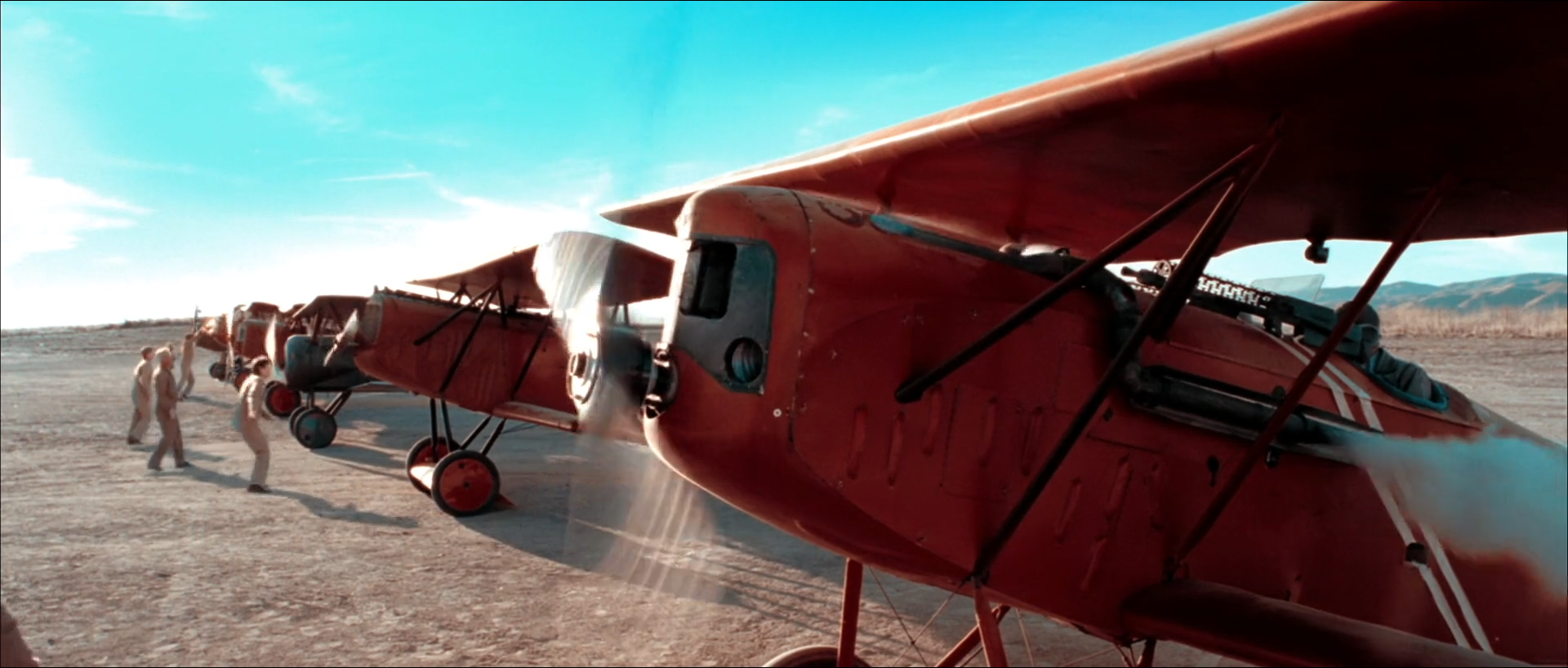
01 · Study I · 1927–1930 · The airfield · shot 22 · 01:04:13:21
A red aeroplane against a turquoise sky
Red biplanes stand in a row on a dusty airfield, the nearest filling the right of the frame, propeller blurred; men in pale clothes walk at left, smoke drifts off the fuselage, and the sky is turquoise with thin cloud.
Red paint and turquoise sky sit at opposite ends of one line; the dust, smoke and shirts fall between them on grey.
What is remarkable
This is the regime in one picture. The aeroplane is the warm pole and the sky the cool pole, and almost everything else — dust, a smoke trail, pale shirts, distant hills — sits between them on or near grey. The palette reads the same way: turquoise #A7F0F3 at 27% and dark red #53191C at 26%, then two pinkish greys. Mean chroma is moderate, C* 18.9, and only 1.5% of pixels are high-chroma: the drama is opposition, not saturation.
Two Inks, Then Three measured this shot: its OKLab axis ratio is 0.013, one-dimensional by the study's threshold, and its reviewed sky mask reads a hue of 200.2°, inside the middle 80% of the era's reviewed skies, 198.8–212.1°. The frame is also a wide split of value, with 36% of the picture in highlights and 31% in shadow; the sunlit side of the nose, the propeller blur and the sky's white cloud are all near the top of the range without clipping.
Where the image comes from
A real aircraft in red dope, a clear desert sky, practical smoke and hard sun supply the construction. The grade supplies the two-colour projection and the pole placement: a red plane and a blue sky in the original would both survive a teal-and-orange grade, but only a projection puts the dust and the shirts on the same line between them.
Balance and expose the full-colour image first, with the pale shirts and the dust neutral. Then project, and place the cool pole from the sky rather than from the red paint; the paint will land wherever the line puts it and should be left there.
Waveform
RGB distribution
Vectorscope
Can regular footage get there?
High
Ordinary daylight exterior footage with a red object and a clear sky reaches this frame with the projection and pole placement nodes; the geometry is exact once G and B share a record.
Minimum capture conditions
A clear or thinly clouded sky exposed with texture.
Neutral references in the frame — dust, pale clothing — balanced before projection.
A strong red object in hard sun, held below clipping on its lit side.
Composite and background read
Practical capture is the plausible read
Contact shadows under the wheels, dust occlusion, a physically coherent propeller blur and the smoke trail's interaction with the fuselage are consistent with one plate. Sky cleanup or enhancement is common in period aviation exteriors, and the far aircraft could be dressed or duplicated, but nothing in the still requires it.
A still cannot rule out sky replacement, aircraft duplication or cleanup; only plates or production records could.
Shot-specific Resolve pass
Use the global tree, then make these decisions
A02
Neutral from the dust and shirts
Balance the full-colour image so dust and pale clothing read grey; exposure from the plane's lit side.
Why: After projection a neutral is only a point on the line; it must be right first.
Watch: A warm-balanced ground becomes a pink field once projected.
A03
Project onto one line
RGB Mixer with G = B = 0.5 G + 0.5 B.
Why: This is what makes the dust and smoke fall between the poles instead of off them.
Watch: Check the vectorscope collapses to one diagonal.
A04
Place the cool pole on the sky
Rotate the cool end toward turquoise from the sky; leave the warm end on skin in adjacent shots.
Why: The sky is this shot's reference colour; the paint is not.
Watch: Rotating from the paint turns the sky blue-green.
A05
Soft shoulder for sky and smoke
Roll the top so cloud and smoke keep a trace of turquoise.
Why: 36% of the frame sits in highlights.
Watch: Clipped cloud reads white and off the line.
Failure modes to check before approval
The red nose clipping on its sunlit side as the plane turns.
Smoke taking a tint off the line after a hue qualifier.
The sky's turquoise drifting between adjacent airfield shots.
Propeller blur fringing red-cyan after projection.
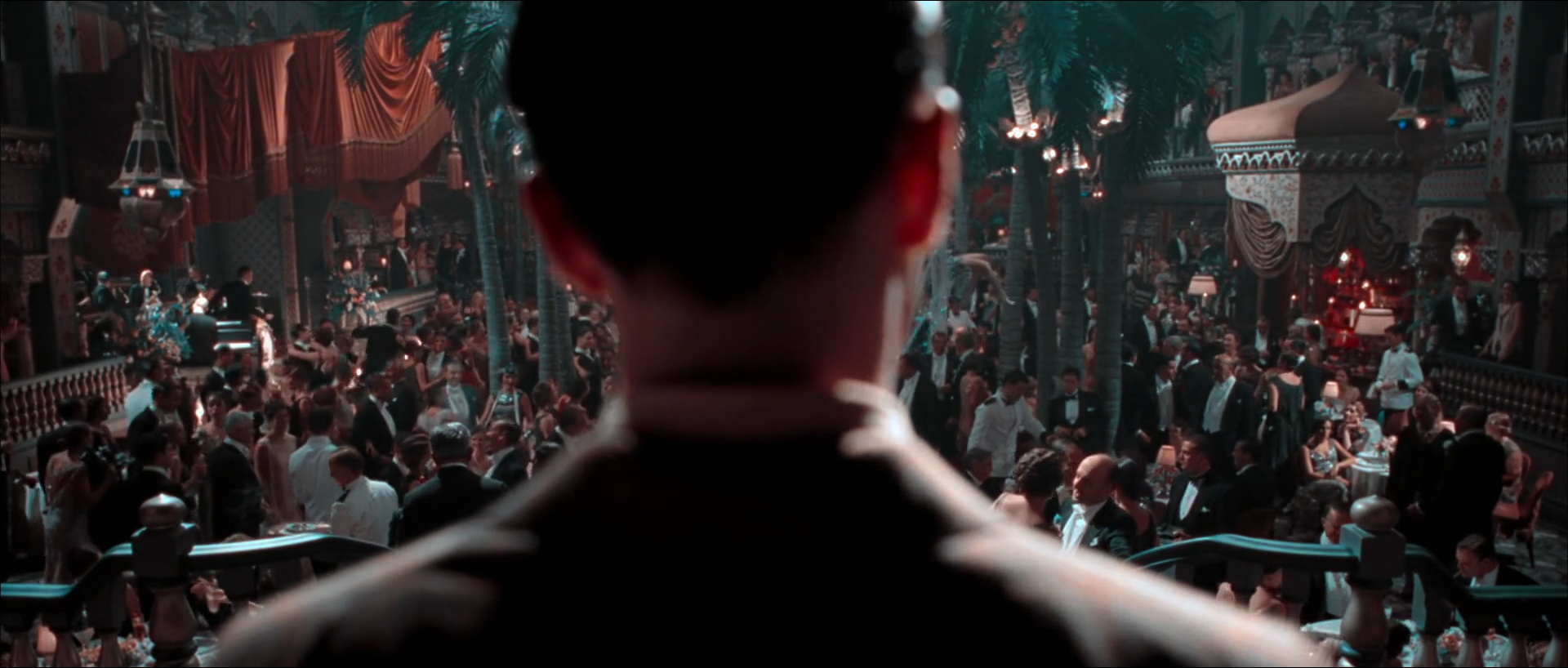
02 · Study II · 1927–1930 · The Cocoanut Grove · shot 31 · 01:05:22:01
A crowded room on one line
Over the shoulder of a dark-haired man seen from behind, a crowded nightclub floor spreads below a balcony rail: palm trunks, red drapes at top left, an onion-domed canopy at right, small lamps and a crowd in black tie.
A low-key, low-chroma room in which red drapes, lamps and skin share the warm pole and black tie and railings go cyan-grey.
What is remarkable
This is a dark, dense frame, mean L* 20.2 with 53% of the picture in shadow and 23% in deep shadow, and it is barely coloured: mean C* 5.2, with the palette reading charcoal #2B2E2E, black, a dark maroon #493332, mid grey and a pale warm grey. The colour that is there sits in two places: the red drapes, lamps and faces are warm, and the dark suits, palm fronds and rail read cyan-grey.
The regime study puts the shot's axis ratio at 0.011, still one-dimensional in a frame with dozens of costumes, set materials and lamp colours. That is the useful case here: a busy art-directed interior with no single dominant colour, which in a three-colour grade would scatter across the vectorscope, collapses onto the same line as an airfield. The foreground head is a near-black silhouette with a thin warm rim on the ear.
Where the image comes from
The set — palms, drapes, lamps and a large dressed crowd — and a low interior exposure produce the image. The grade projects it; it does not choose which costume becomes which colour. A gown that was green becomes cyan-grey, one that was red becomes warm, and one that was yellow lands near the warm pole's lighter, orange end.
Hold the room's low key and let the silhouette stay dark. Keep the lamps from blooming across the crowd, and do not try to separate the crowd by hue after the projection; density and the practicals are the only tools left.
Waveform
RGB distribution
Vectorscope
Can regular footage get there?
Conditional
The geometry is easy; the frame is conditional on a low-key interior captured with enough shadow latitude that faces in the crowd still read after the toe is printed down, and on practicals held below clipping.
Minimum capture conditions
A dressed interior exposed low with shadow detail in the crowd.
Practical lamps recorded below clipping.
A foreground silhouette with a controlled rim rather than a lit face.
Composite and background read
A large practical set is the plausible read
Depth, occlusion among the crowd, lamp pools on tables and the consistent haze are coherent with a single large set. Upper balconies or the ceiling could have been extended, a routine choice for a period nightclub, but no edge, scale or parallax cue here indicates it.
Set extension or crowd augmentation cannot be ruled out from a still.
Shot-specific Resolve pass
Use the global tree, then make these decisions
A05
Print the toe down
Dense toe so black tie and the silhouette read as ink with a small step above black.
Why: The room's depth is built from density, not colour.
Watch: Crushing the crowd's faces into the suits.
A08
Hold the lamps
Key practical lamps before projection; lower their density and bloom slightly.
Why: The lamps are the only warm highlights in the room.
Watch: Lamp blooms spreading across the crowd.
A03
Project onto one line
Shared G/B record.
Why: Collapses the art department's many colours onto two.
Watch: A hue key after this node finds nothing to separate.
A09
Keep the silhouette dark
No face window on the foreground head; a soft window may lift the far crowd slightly.
Why: The silhouette frames the room; lifting it adds a second subject.
Watch: A visible window edge on the balcony rail.
Failure modes to check before approval
Faces in the crowd sinking into black suits.
Lamp blooms clipping and losing the warm pole.
Coloured noise in the deep toe after projection.
The rim on the foreground ear flickering as the head moves.
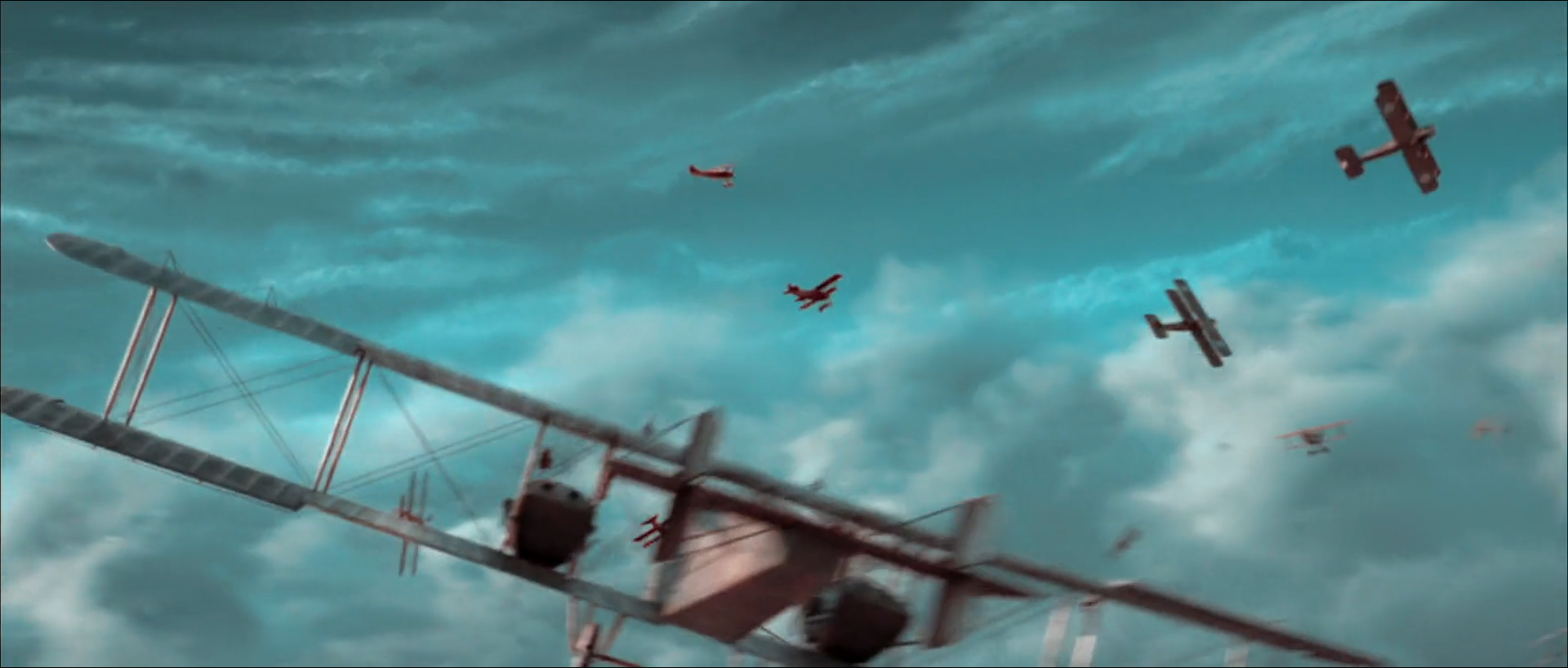
03 · Study III · 1927–1930 · The aerial sequence · shot 189 · 01:16:12:03
A built sky, printed in two inks
A large biplane bomber banks across the frame against turquoise-grey cloud, with several smaller biplanes around it in red-brown against the sky.
Regular-footage feasibility: Low — useful referenceComposite/VFX read: high
Almost the whole frame is cloud and sky on the cool pole; the aircraft are small warm accents on the same line.
What is remarkable
This is the most one-dimensional frame in the report and one of the most uniform: the regime study's axis ratio for it is 0.002, and its reviewed sky mask covers 98% of the picture at an OKLab hue of 204.2°. The slide lab's measures agree from a different direction: mean a* −13.8, b* −7.2, a warm/cool balance of 0.05, no pixel in deep shadow and almost none in shadow at all. It is a cyan-grey field with small warm objects in it.
The value structure is flat and bright — mean L* 57.3, σL* only 11.8 — with cloud texture carrying the image. The bomber's grey structure and the small biplanes' red-brown are the only departures, and the planes land on the warm pole's darker, redder end.
Where the image comes from
The construction is almost certainly visual effects: an aerial sky, cloud and aircraft combined from elements rather than a camera flying in formation. The grade's contribution is the emulation applied to the finished composite, so that the elements and the plate share one line, plus density placement that keeps the cloud from going paper-white.
Integrate elements in full colour first, then project once. The shot's usefulness as a reference is that it shows how completely the regime absorbs a blue sky: the sky is not graded turquoise so much as projected there.
Waveform
RGB distribution
Vectorscope
Can regular footage get there?
Low — useful reference
Settling on a useful reference rather than a generally reproducible candidate. The grade is easy to apply to such a composite; the frame's construction — aircraft elements, a controlled cloudscape and their integration — is not something a grade can supply from ordinary footage.
Minimum capture conditions
Aircraft elements (miniature or CG) with matching light direction and motion blur.
A cloud plate or rendered sky with texture across the frame.
Compositing in full colour before the emulation.
Composite and background read
Environment and aircraft work are strongly plausible
Several aircraft at different scales in formation around a banking bomber, a sky without horizon or ground, and perfectly coherent emulation across every element point to a constructed shot. The film's aerial sequences are widely understood to combine miniatures and computer-generated work with live-action material.
This is a reading of construction, not a production credit; which elements were miniature, CG or photographed cannot be determined from a still.
Shot-specific Resolve pass
Use the global tree, then make these decisions
A12
Integrate in full colour
Match aircraft density, softness and motion blur to the cloud plate before any emulation.
Why: Emulating elements separately gives them slightly different lines.
Watch: Edges fringing warm on the cloud after projection.
A03
Project the finished composite
Shared G/B record, once, on the comp.
Why: The projection is what unifies elements and plate.
Watch: Any element that bypasses it reads as a sticker.
A07
Keep the cloud dense
Hold the sky field below white with a soft luminance key; keep texture.
Why: The whole frame is sky.
Watch: Flat, paper-white cloud losing the turquoise.
A11
Unify texture
One grain pass after projection across the whole frame.
Why: Elements and plate need the same grain to share the print.
Watch: Grain visible on the plate but not on the aircraft.
Failure modes to check before approval
Aircraft edges carrying a warm or cyan fringe after projection.
Element grain and softness differing from the cloud plate.
Cloud clipping in the brightest frames of the bank.
Motion blur on aircraft inconsistent with camera motion.
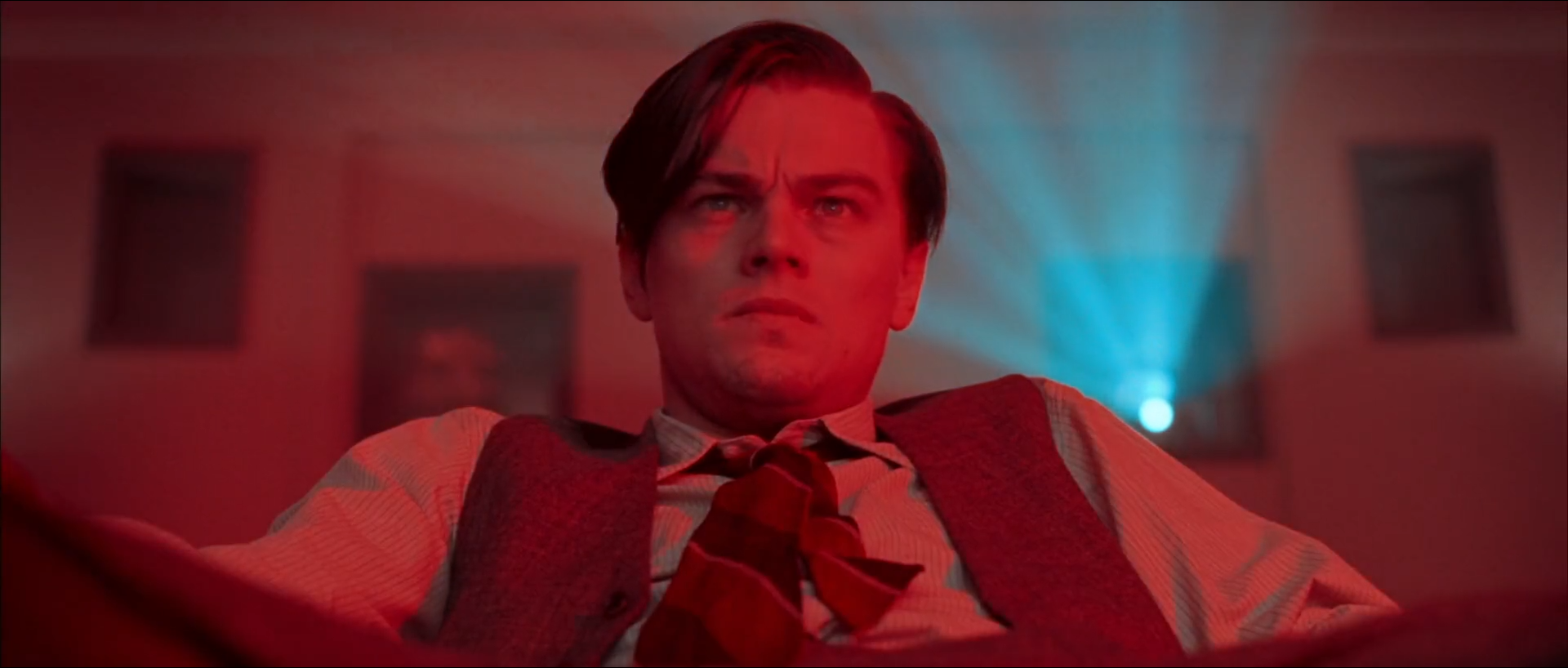
04 · Study IV · 1927–1930 · The red room · shot 216 · 01:19:08:18
A red room with a cyan beam in it
Hughes, in shirt sleeves, a waistcoat and a loosened tie, looks up from a low angle in a room drenched in red light; behind him on the right a projector beam cuts through the air in pale cyan.
Red light places the whole room on the warm pole; the projector beam is the only cool colour and sits exactly opposite.
What is remarkable
This is the most saturated frame here, mean C* 32.2 with 29% of pixels high-chroma, and it is still on the line: the regime study reads its axis ratio as 0.003. The palette is four reds and pinks — #751F27, #501E23, #764747, #AE3538 — and one pale cyan, #618A97, at 12%: the beam and its glow. There is no third colour.
The value structure is a middle-key room with a bright spot: mean L* 31.2, only 1% in deep shadow, with the beam's source and the lit forehead near the top. The face is not separated from the room by hue — both are red — but by value and by the pale rim of light the beam puts on the hair.
Where the image comes from
A red-lit set and a practical projector beam in haze supply the colour; the two-colour process has nothing to do but keep them. In a three-colour grade the same red light would already look like this. What the regime adds is that the beam, whatever it was in the original, lands on the cool pole's turquoise rather than on a blue or white.
Grade the face for density inside the red, keep the beam's cyan pale rather than saturated, and do not attempt to recover skin hue: under a red source skin is red, and the projection agrees.
Waveform
RGB distribution
Vectorscope
Can regular footage get there?
High
A red practical wash, a haze-lit beam and a face exposed for density reach this frame directly; the projection keeps what the lighting makes.
Minimum capture conditions
A narrow red source recorded without clipping the red channel.
Haze and a beam or other cool source exposed at its own level.
Enough exposure on the face to keep texture inside a single-hue light.
Composite and background read
No visible reason to invoke compositing
The beam's haze, the rim it puts on the hair and the soft focus of the background frames are coherent with practical capture.
Invisible cleanup or beam enhancement cannot be ruled out from a still.
Shot-specific Resolve pass
Use the global tree, then make these decisions
A08
Hold the red source
Key the red light's pool and keep the red channel off its clip; lower density rather than saturation.
Why: A clipped red channel turns the red face orange-white.
Watch: Posterization in the red gradient on the wall.
A06
Face by density only
Face window before projection; +0.1–0.2 stop on the lit plane.
Why: Inside a red light the face separates by value.
Watch: Trying to pull skin toward a normal hue.
A03
Project onto one line
Shared G/B record.
Why: Places the beam exactly opposite the room.
Watch: The beam gaining a blue component if the mix is skewed.
A10
Keep the brightest red from yellowing
Limit the warm-side bend here to a small amount.
Why: Under a red source the bright forehead should stay red-pink, not straw.
Watch: A yellow cast across the lit forehead.
Failure modes to check before approval
Red channel clipping on the forehead and shirt.
Banding in the red wall gradient.
The beam saturating into a solid cyan shape.
Noise in the red channel of the dark waistcoat.
05 · Study V · 1927–1930 · The premiere · shot 357 · 01:22:59:01
A face erased by flashbulbs
A close-up of Hughes looking down, his face washed almost to white by flash, with large red letters of a sign and a blurred crowd behind him and a platinum head of hair at the right edge.
Flash pushes the face and collar to the pale end of the warm pole while the red letters and dark crowd stay dense.
What is remarkable
The frame is split between an overexposed foreground and a dense background: 40% of the picture in highlights, 29% in shadow, σL* 33.0. The face has lost most of its modelling: the brow and nose are drawn, the cheeks and forehead are almost flat pale pink, and the white collar has no texture. Yet the frame is not neutral — the palette runs from near-white #F6F8F7 at 32% to a saturated red #D22334 at 9%, the sign.
The regime study measures the axis ratio at 0.002: even a blown-out face and a red sign sit on the line. The face, being bright, lies where the warm pole has bent toward orange-pink; the red letters, being darker and more chromatic, sit at the pole's red end. The platinum hair at the right edge reads pale cyan, the only cool area.
Where the image comes from
The flash is photographic: either real flashbulbs or a lighting event designed to overexpose, captured on the day. The grade can hold the red sign's density and keep a trace of the warm pole in the face, but it cannot restore modelling that the exposure removed.
Let the face go. Place the shoulder so the face keeps a faint pink rather than clipping to white, and keep the dense background dense so the wash reads as an event rather than an exposure mistake.
Waveform
RGB distribution
Vectorscope
Can regular footage get there?
Conditional
Reachable only if the capture already overexposes the face by a controlled amount with the background held; a grade cannot produce the flash's wrap and loss of shadow from a normally exposed face.
Minimum capture conditions
A real flash or strobe event overexposing the subject by roughly two to three stops.
Log or raw highlight latitude so the face keeps a tint rather than clipping.
A dense, saturated background to anchor the frame.
Composite and background read
Practical flash capture is the plausible read
The wash wraps the face and collar consistently with a frontal source and falls off into the crowd. Flash frames are sometimes augmented in post, but no edge or timing cue here requires it.
A still cannot show whether the flash was enhanced; its duration and frame-to-frame shape need moving footage.
Shot-specific Resolve pass
Use the global tree, then make these decisions
A05
Roll the face below white
A soft shoulder so the washed face keeps a faint warm tint and the collar just holds.
Why: A clipped face sits off the line at white.
Watch: Hard clip edges around the nose and brow.
A08
Treat the flash as an event
Key the flash-lit area; limit any lift to density, never add glow.
Why: The wash is the subject; adding bloom makes it a filter.
Watch: Flash frames that differ in density from their neighbours.
A03
Project onto one line
Shared G/B record.
Why: Keeps the red sign and the pale face on one line.
Watch: The platinum hair acquiring a blue cast.
A10
Let the bright face go orange-pink
Allow the warm-side luminance bend here.
Why: Bright skin in the regime is paler and yellower than skin in shadow.
Watch: Pushing it so far the face reads yellow.
Failure modes to check before approval
The face clipping to white and falling off the warm pole.
Frame-to-frame flicker in the wash across the shot.
The red sign clipping its red channel.
Colour noise in the dense crowd behind.
06 · Study VI · 1935 · The golf course · shot 602 · 01:29:08:20
Faces among rust trees and cyan grass
Hughes, in sunglasses and a patterned sweater vest, walks beside a young caddy in a flat cap and a woman in a white jacket holding a golf club, on a sunlit course whose grass reads cyan-grey and whose backlit trees glow rust-pink.
The grass lands on the cool pole and the backlit leaves on the warm one; three faces are placed between them on skin.
What is remarkable
Foliage is where the two-colour regime is most visible and most strange. In this frame the lawn is cyan-grey, the shaded trees at right are cyan-dark, and the backlit leaves at centre glow rust and pink. Two Inks, Then Three explains the split: lit two-colour foliage divides around an axis near 118°, so green that leans yellow falls warm and green that leans blue falls cool. Green vegetables move from an OKLab hue of 205.5° in the two-colour regime to 119° in the three-colour one.
The faces sit comfortably inside it. The shot is only moderately coloured — mean C* 8.9, no high-chroma pixels at all — and bright, with 19% in highlights: the white jacket, sun on the grass and the rims on hair and shoulders. The regime study reads its axis ratio as 0.010. The woman's red hair and lipstick are the most chromatic warm objects, and they stay on the same line as the faces.
Where the image comes from
A real golf course in hard backlight, wardrobe in browns, whites and a red-haired performer supply the construction. The rust trees and cyan grass are the projection's doing: no green was painted out. The grade places exposure so the white jacket holds and the rims keep texture, and places the poles from the faces.
Resist the instinct to repair the foliage. The split is the look; a qualifier that pulls grass back toward green, or trees toward it, rebuilds the third dimension. If anything, choose the G/B mix in the projection to decide how much of the lawn goes cyan and how much greys out.
Waveform
RGB distribution
Vectorscope
Can regular footage get there?
High
Daylight exterior footage with foliage and faces reaches this frame with the projection, pole placement and a soft shoulder; the foliage split follows from the mix rather than from painting.
Minimum capture conditions
Backlit or side-lit foliage with a range of yellow-green and blue-green.
White costume exposed below clipping.
Faces lit well enough to keep modelling inside strong backlight.
Composite and background read
Practical location capture is the plausible read
Shadows on the lawn, the rim light on all three figures and the depth of the trees behind are coherent with one plate. A long walking-and-talking take like this one is rarely composited, though cleanup of the background is always possible.
Background cleanup or sky replacement beyond the trees cannot be ruled out from a still.
Shot-specific Resolve pass
Use the global tree, then make these decisions
A02
Neutral from the white jacket
Balance so the jacket reads just off white and grey on the scope.
Why: The jacket is the frame's neutral reference and its brightest area.
Watch: A warm-balanced jacket becomes pink after projection.
A03
Choose the foliage split in the mix
Adjust the G/B mix between 0.6/0.4 and 0.4/0.6 to decide how cyan the lawn goes.
Why: The mix, not a qualifier, decides where green lands.
Watch: A qualifier after projection has nothing to work with.
A06
Faces on skin
Key faces before projection; hold lit-side density inside the backlight.
Why: Three faces must read as skin against rust leaves on the same warm pole.
Watch: Faces merging with the pink foliage in value.
A05
Hold the rims
Soft shoulder for the jacket and the rims on hair and shoulders.
Why: The backlight's edges carry the figures.
Watch: Clipped rims turning white and off the line.
Failure modes to check before approval
Faces and backlit leaves converging in value and hue.
The white jacket clipping in the sunniest frames.
Lawn flickering between cyan and grey as the camera moves.
Rim light edges acquiring a cyan fringe.
07 · Study VII · 1935 · The dinner · shot 696 · 01:35:08:22
Twelve peas the colour of the sky
Seen from above, a white plate with a copper leaf border holds a grilled steak and twelve peas laid out in a neat grid, a fork resting on it; knives and a folded napkin lie at right and a hand in a black sleeve enters at lower left.
The peas are cyan, the steak dark red and the plate grey: three objects, two poles and the neutral between them.
What is remarkable
The regime study uses this plate as a known-colour control, and it is the clearest one in the film. Peas should be green; here they measure an OKLab hue of 205.7°, within one degree of the era's reviewed sky at the same position on the line, with a hue concentration of 0.994 across 11,424 pixels. The steak sits at the warm pole's dark, red end. The plate, tablecloth and silver are grey.
The frame is quiet otherwise: mean L* 42.4, mean C* 6.1, no high-chroma pixels, and a palette of greys — #757C7C, #8F9B9E — with a dark maroon and near-black. The peas occupy a tiny share of the frame, which is why they matter: they are small, round, textureless and unambiguous, and nothing about their shape or light can explain their colour except the process.
Where the image comes from
Ordinary peas, an ordinary steak and a white plate, lit softly from above. The cyan is entirely the emulation. That makes the shot the best reconstruction test in the report: if the projection and pole placement are right, the peas land on the sky's hue without any qualifier.
Balance the tablecloth to neutral, project, and check the peas on the vectorscope. If they miss the sky, the mix or the cool pole is wrong for the whole regime, not for this shot.
Waveform
RGB distribution
Vectorscope
Can regular footage get there?
High
Any correctly balanced tabletop footage reaches this frame through the projection. It is the most reliable check that the emulation is placed correctly.
Minimum capture conditions
A neutral tablecloth and plate for balance.
Green vegetables recorded with their true hue.
Soft overhead light without strong colour of its own.
Composite and background read
No visible reason to invoke compositing
Contact shadows under the peas and fork, the hand's occlusion and consistent depth of field point to one practical insert.
Invisible cleanup cannot be ruled out from a still.
Shot-specific Resolve pass
Use the global tree, then make these decisions
A02
Neutral from the tablecloth
Balance tablecloth and plate to grey before projection.
Why: The test only works if the neutral is right.
Watch: A warm cloth pushing the whole line off centre.
A03
Project onto one line
Shared G/B record.
Why: Carries green peas to the cool pole with no qualifier.
Watch: A skewed mix leaving the peas grey-green.
A04
Check the cool pole on the peas
Compare pea hue with the era's sky; adjust the cool end only if they differ.
Why: Peas and sky share one ink in the regime.
Watch: Adjusting the peas alone with a qualifier.
A05
Dense steak, clean plate
Hold the steak's toe dense and the plate below white.
Why: The steak anchors the warm end.
Watch: The plate's highlights clipping to paper.
Failure modes to check before approval
Peas landing grey-green because the mix or neutral is off.
The plate's rim highlights clipping.
The steak's dark red going brown.
The hand's black sleeve showing coloured noise.
08 · Study VIII · 1935 · The close-up · shot 937 · 01:48:56:15
Skin is the warm pole
Hepburn, red-haired and freckled, looks up at Hughes, whose dark head fills the left foreground; her hand rests at her neck, she wears a red patterned dress, and a cool window glow sits high in the background.
Skin, hair and dress fill the warm pole at three densities; the eyes, shirt and window are the only cool notes.
What is remarkable
Here the warm pole is most of the picture. Skin, red hair and a red patterned dress occupy it at three densities, and the palette — near-black, a mid rose-brown #7F5C56, two dark maroons — is warm except for one pale cyan, #8EB1BA at 13%, the man's white shirt and the window. The frame is dark around a bright face: mean L* 27.7, 45% in shadow, 24% in deep shadow.
Two Inks, Then Three finds skin in the 1935 era at a mean OKLab hue of 31.5° with a spread of only 9.8°, tighter than in any other era; the fitted axis for the era sits at 29.0°. Faces are not coloured toward the pole; they define it. The irises read blue-grey here. The study finds sampled irises cyan only in the two-colour eras: a mean OKLab hue of 196.3° in 1927–1930, and 169.4° in 1935 with 64% on the cool side, against 0–18% in the three-colour eras.
Where the image comes from
A performer with red hair and fair, freckled skin, a red costume and soft warm key light supply the construction. The grade places the warm end of the line on her skin and keeps hair and dress distinct from it by density. Its most delicate job is the eyes: they must stay cool and clean against a warm face without a qualifier that would break the line.
Grade the face first, in full colour. After projection, the only question is density: the skin is the lightest warm tone, the hair a step darker, the dress darker again.
Waveform
RGB distribution
Vectorscope
Can regular footage get there?
High
A well-lit close-up reaches this frame directly with skin work done before the projection and the warm pole placed from the face.
Minimum capture conditions
Soft key light exposing the face with texture.
Costume and hair recorded at densities distinct from skin.
Light-coloured eyes, which the projection carries to the cool pole on its own.
Composite and background read
No visible reason to invoke compositing
Depth of field, the foreground head's occlusion and the soft window behind are coherent with a single practical close-up.
Invisible beauty work or cleanup cannot be ruled out from a still.
Shot-specific Resolve pass
Use the global tree, then make these decisions
A06
Place the face first
Key skin in full colour, set lit-side density and hue so it lands on the warm end after projection.
Why: In this frame skin is the pole.
Watch: Freckles flattening under a heavy skin key.
A04
Rotate the warm end to this skin
Use this shot to set the regime's warm-pole hue.
Why: The pole should be placed from faces, not from red objects.
Watch: Rotating from the dress instead of the face.
A05
Separate hair and dress by density
Dense toe for the dress and the foreground head, hair a step lighter.
Why: After projection density is all that separates warm objects.
Watch: Hair and dress merging into one dark red.
A09
Keep the eyes clean
A small face window lifting eyes; no qualifier on the irises.
Why: The irises land cool through the projection itself.
Watch: A qualifier on the eyes that pulls them off the line.
Failure modes to check before approval
Skin and red hair converging in density.
The white shirt at left clipping to white rather than pale cyan.
Freckle texture softened by glow or noise reduction.
The window glow drifting in hue across the shot.
May I count your visit? Google Analytics would tell me which pages get read.
Nothing loads from Google unless you say yes, and you can change your mind
from the footer.